Appearance
Consumables Management
Consumables are items that are used up and not returned — printer toner, batteries, pens, cleaning supplies, and similar materials. Unlike accessories, consumables are checked out once and not expected back.
Consumables vs. Accessories
The key difference between consumables and accessories:
- Accessories are checked out and expected to be returned (keyboards, mice, headsets)
- Consumables are checked out and consumed (toner cartridges, paper, batteries)
This distinction helps you understand your true inventory costs and consumption rates.
Viewing Consumables
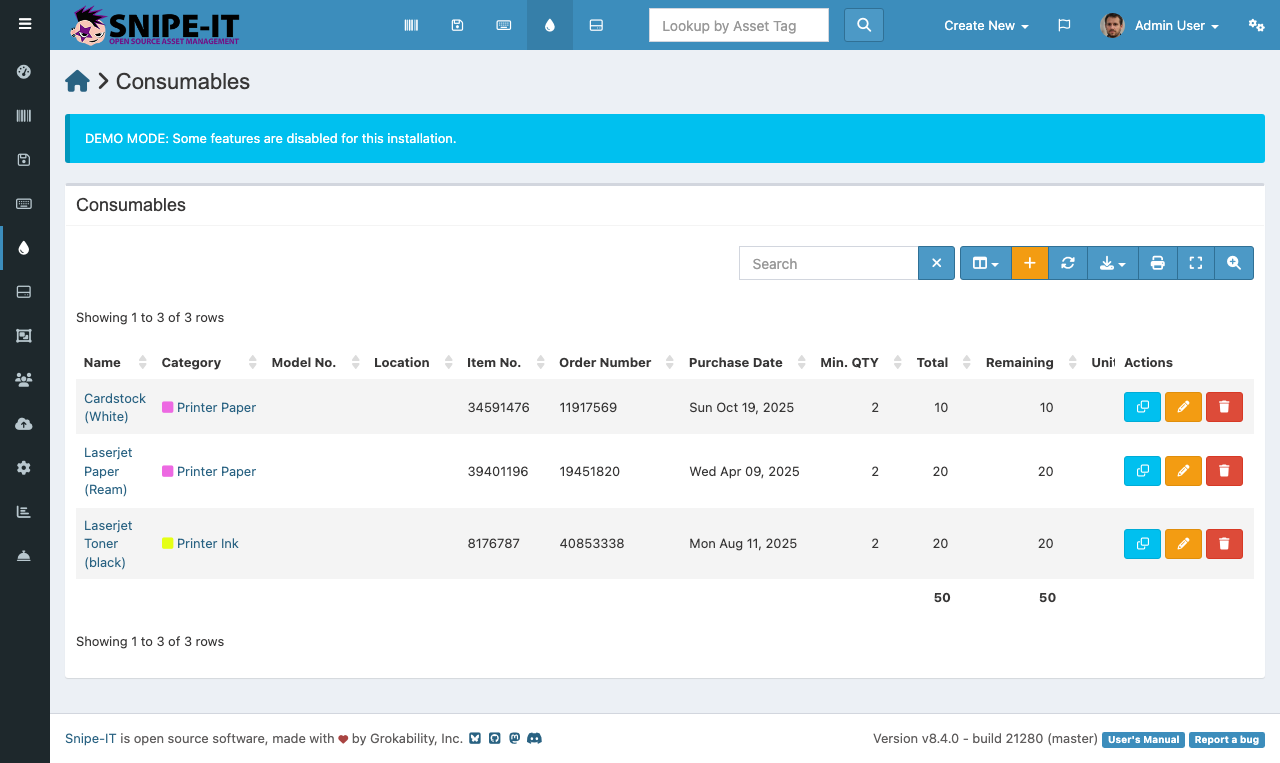
The consumables list displays:
- Name — The consumable item name
- Category — Item category for grouping
- Quantity — Remaining stock
- Min Quantity — Reorder threshold
- Model Number — For identifying the exact product to reorder
Adding Consumables
- Click "Create New" [2] and select "Consumable"
- Enter the item name, category, and total quantity on hand
- Set a minimum quantity to trigger reorder alerts
- Click Save
Tracking Usage
When consumables are issued to users, click the consumable name and use the "Checkout" button. Select the user receiving the item. The quantity decreases permanently since consumables are not returned.
The activity log on the consumable's detail page shows the full history of who received items and when, helping you identify usage patterns and plan procurement cycles.